TicoMesa
Built for sodas and restaurants in Costa Rica

Your guests order from the table with a QR. The order reaches the kitchen and printer on its own.

Forget crossed-out paper pads, running to the counter, and "is table 4 ready yet?". Your guests browse the photo menu right on their own phone—with no app to download—and your team gets every order instantly.

  • No app downloads
  • Instant thermal kitchen tickets
  • Direct delivery with 0% commission

Direct support in Costa Rica · Plans starting at $30/mo (approx. ₡15.300) · Ask about launch pricing.

The daily rush-hour headache

When the dining room fills up, paper pads fall short.

You do not need an expensive or complicated system—just a clean way for orders to move from the table or phone straight to the kitchen.

01 · Paper pads & messy handwriting

"Did they want the casado without onions or without salad?"

During rush hour, paper pads get crossed out, servers shout over the noise, and the kitchen ends up preparing the wrong dish.

Result: sent-back plates and frustrated guests
02 · Back-and-forth to the kitchen

"Is table 4 ready yet?"

Guests keep asking about their food, staff waste minutes walking back and forth to the kitchen, and tables take longer to pay and turn over.

Result: slower table turnover and missed orders

03 · Painful delivery commissions

"Delivery apps take up to 30% of every sale"

When your regulars order through third-party delivery apps, you cook the exact same dish but keep far less of the profit.

External app -28% commission
Your TicoMesa link 0% per order

With TicoMesa, guests choose clearly, the order goes straight to the kitchen, and you keep 100% of every sale.

Try live demo ↓

How it works

Three steps from paper pads to full control

Runs on the tablet, phone, or computer you already have in your restaurant.

  1. 1 Step 1

    Upload your menu and place a QR on each table

    Add your dishes with photos, prices in colones, extras, and approximate cost. TicoMesa generates a unique QR code for each table plus your direct delivery link.

    Ready in one afternoon from any computer or phone.

  2. 2 Step 2

    Guests order straight from their own phone

    They scan the QR with their regular camera—no app downloads or sign-ups—customize their dish, add notes, and send the order.

    Table orders can be paid upfront or at the end, as you choose.

  3. 3 Step 3

    Kitchen sees the order and prints the ticket

    The order lands instantly on the kitchen display board and prints automatically on 58 mm or 80 mm thermal paper via Bluetooth or USB on Android.

    No running back and forth, no unreadable handwriting.

Designed for Costa Rica

Adapts to how your restaurant charges today

Set your dining room to match your service flow:

Soda Mode · Pay when ordering Included in all plans

Guest orders, pays, and the table stays open for 20 minutes

Ideal for sodas and walk-up counters where guests pay when ordering. After checkout, the table gets a 20-minute grace period so the guest can add a drink, coffee, or dessert from their phone without re-scanning.

✓ Cuts counter lines just to order an extra drink

Restaurant Mode · Open tab Casado & Banquete Plans

Guests order throughout their meal and pay at the end

Built for full-service sit-down restaurants. Guests order appetizers, main dishes, and drinks at their own pace—everything adds to the same table tab, and the table clears once paid at the end.

✓ Clear table bill with no paper receipts to add up at the end

Live interactive demo

Try it right now with your own phone

Point your camera at the QR code to browse a real menu just as your guests will at the table. Already viewing this page on your phone? Tap the button below to open it directly.

On your phone right now? Tap here to open the menu without scanning:

Open live demo menu

No sign-up · Opens right in your browser

LIVE ORDER FLOW ~3 sec to kitchen
01

Scan QR

Table or counter

02

View menu

Photos & extras

03

Send order

No app needed

04

In kitchen

Real time

05

Ticket prints

58 / 80 mm

Scan with your phone camera

Live demo menu

On desktop: point your camera · On mobile: share it or tap the red button

Everything your kitchen and dining room need

Real screens designed to be read from two meters away

Screenshots captured directly from the live application running a Costa Rican sample menu ("Soda La Tica").

1 · Digital QR menu

Guests customize their exact plate and you avoid mix-ups

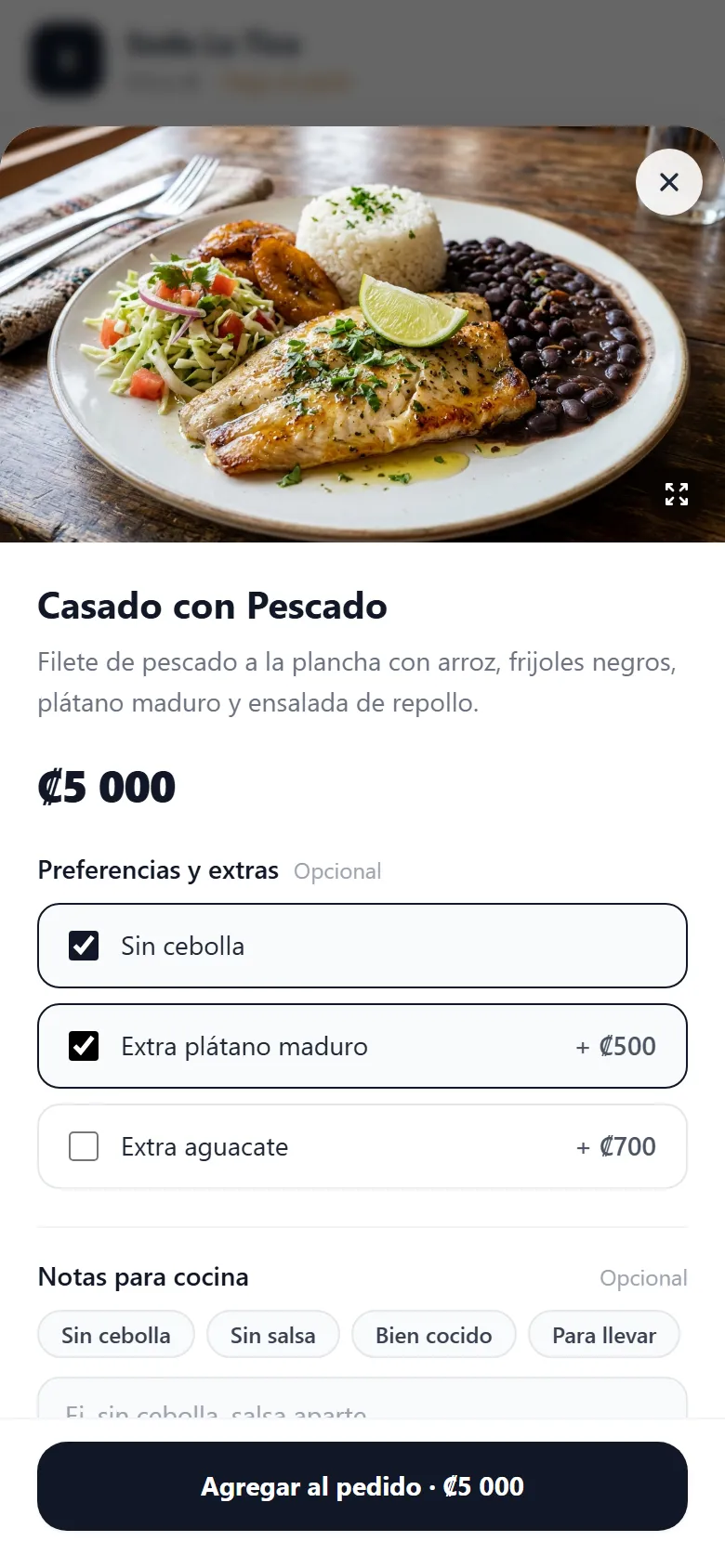
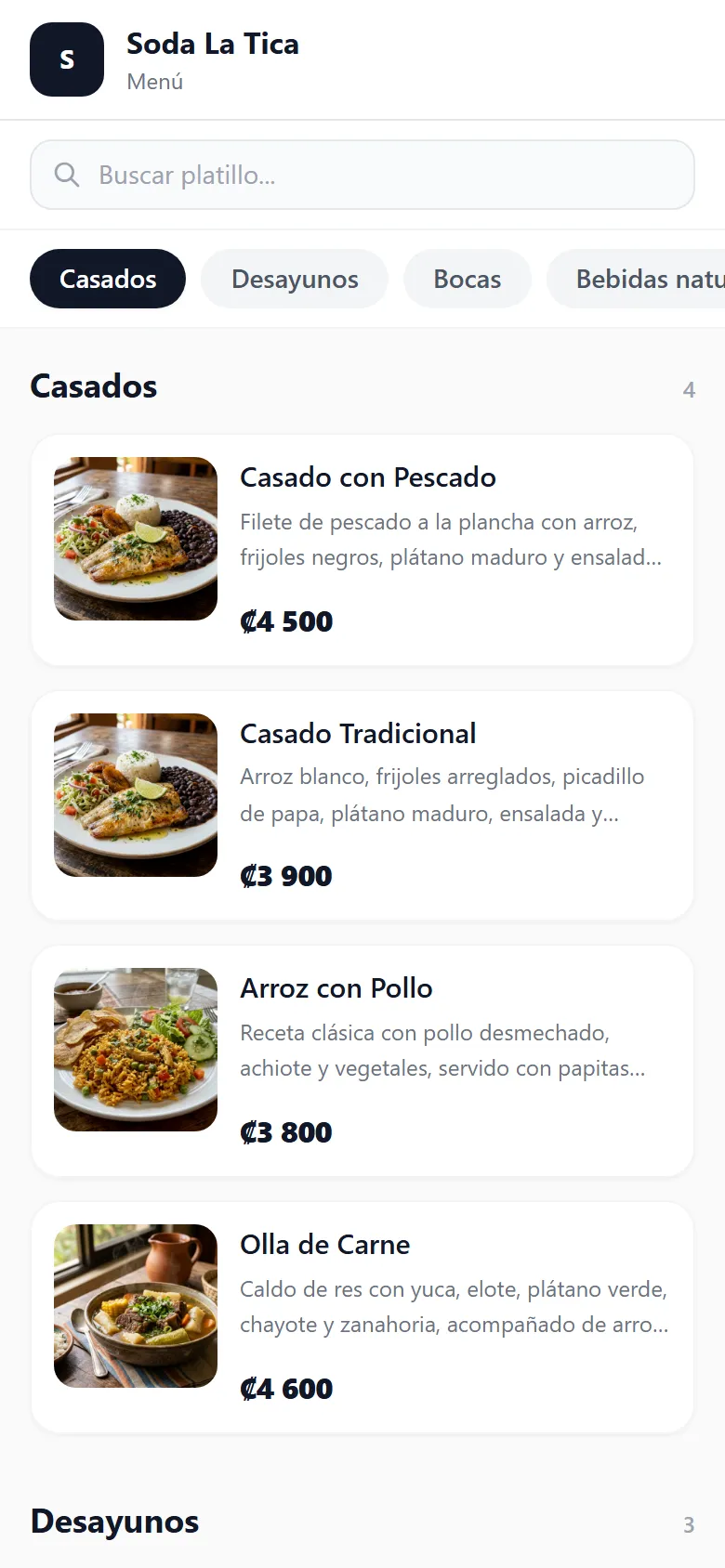
Mouth-watering photos, organized categories, and required or optional modifiers ("no onions", "extra sweet plantain", "grilled chicken").

  • Runs right in the phone browser with nothing to install.
  • You choose per restaurant whether guests pay when ordering or at the end.
  • Also supports direct pickup and local delivery orders.
Real photos + modifiers ("No onions", "+Plantain ₡500")
Menu by categories
Soda La Tica digital menu on mobile with real photos of Casado con Pescado, Arroz con Pollo, and Olla de Carne
Extras & notes
Dish detail screen for Casado con Pescado showing modifiers No onions and Extra sweet plantain
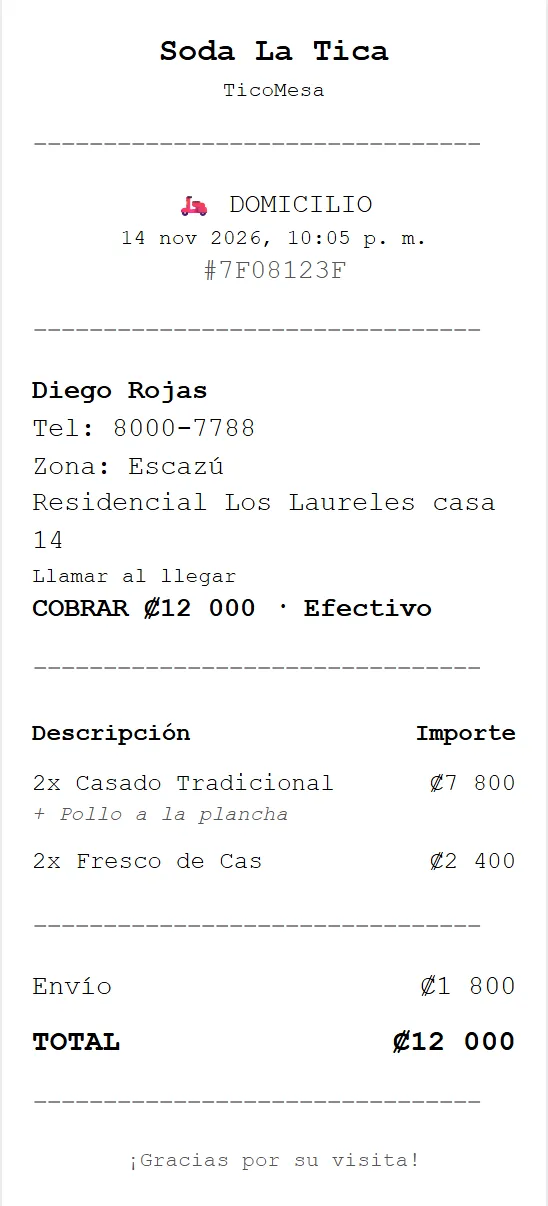
58 mm or 80 mm thermal ticket ready for counter or driver
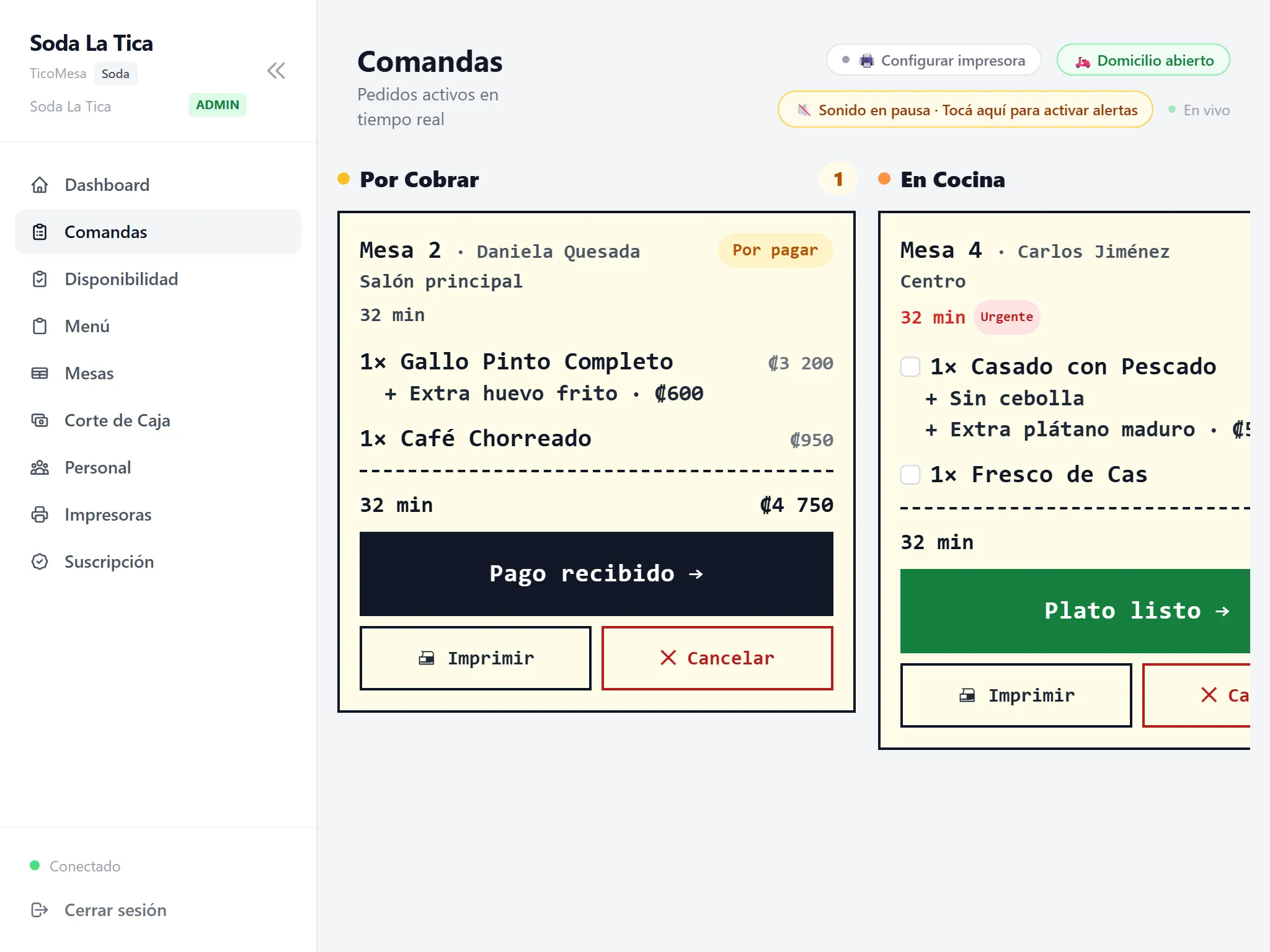
Kitchen Order Board
Real-time kitchen order board with columns To Charge and In Kitchen for Table 2 and Table 4
Preview of a 58 mm thermal ticket showing customer info, delivery, items, and total in colones
2 · Kitchen orders + Thermal ticket

Every order lands in real time and prints a clear ticket

Your staff sees at a glance what needs payment, what is cooking, and what is ready. Pair a 58 mm or 80 mm thermal printer and tickets print ready for the pass or delivery driver.

  • Bluetooth on Android, Windows, or macOS, or direct USB cable on Android.
  • Automatically catches up missed orders if the restaurant Wi-Fi drops briefly.
  • Separate roles for Admin, Server, and Kitchen.
3 · Floor tables & sold-out items

Controlled tables and zero orders for sold-out dishes

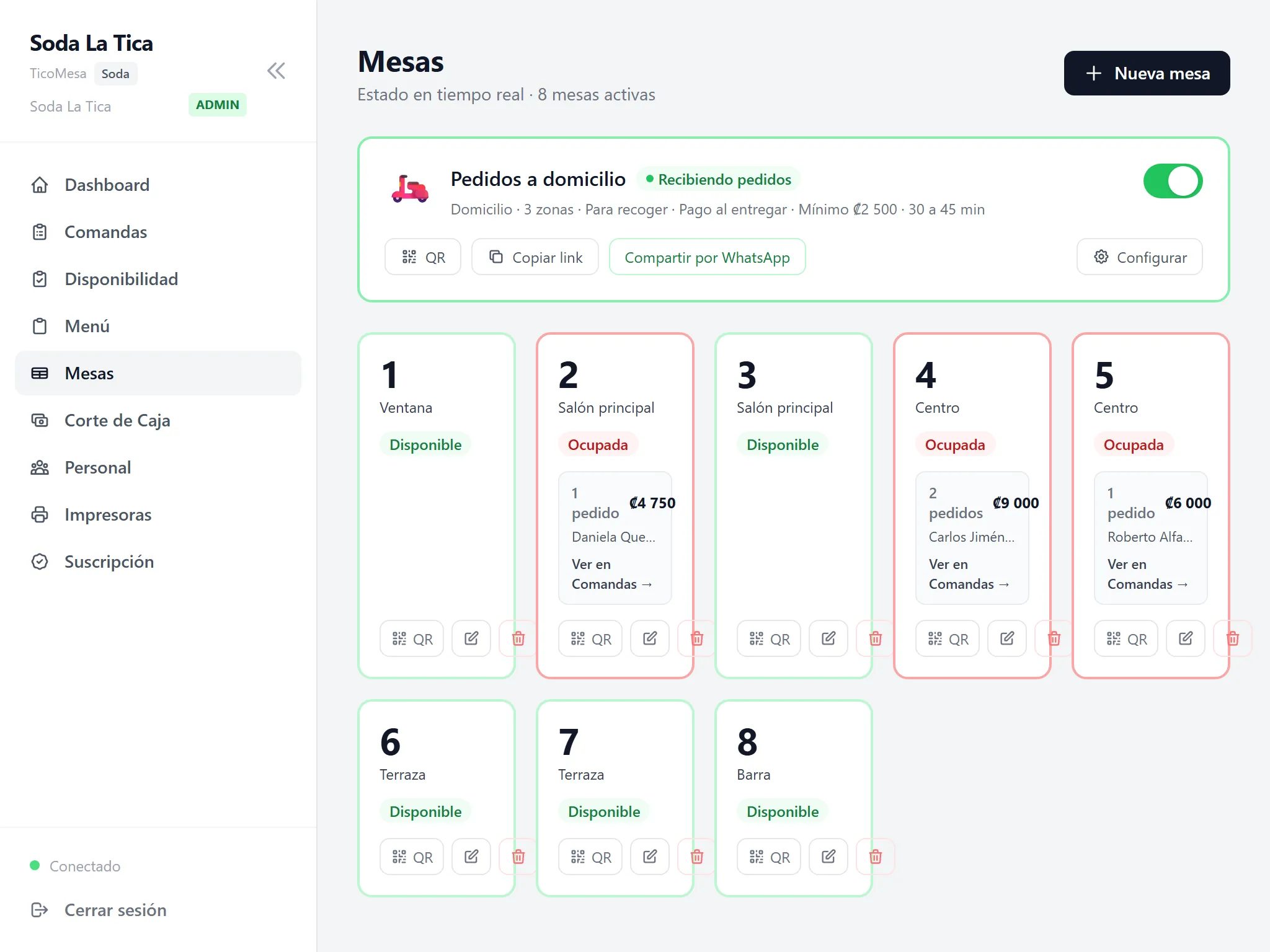
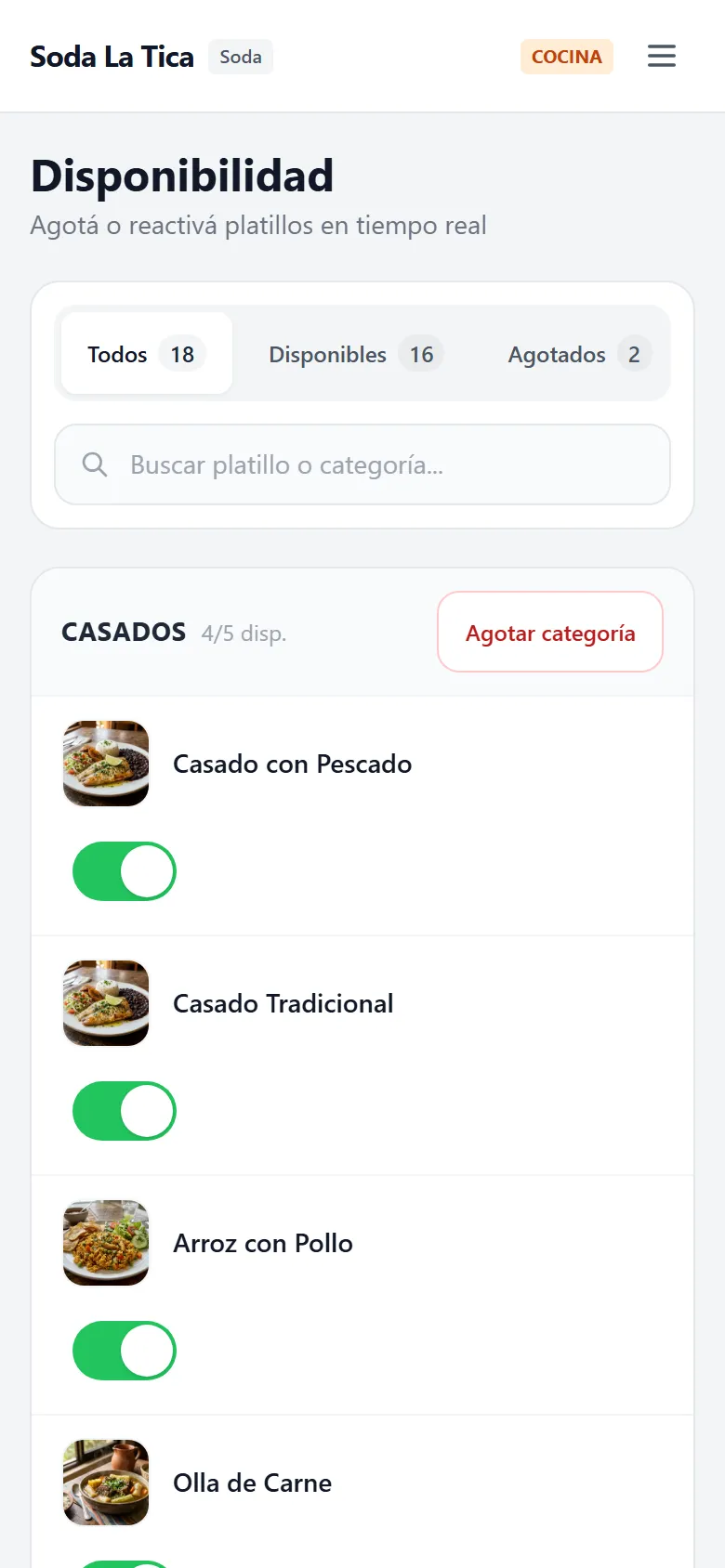
See which tables are free or occupied, download each table’s QR code, and mark sold-out items off the menu in one tap so they disappear immediately.

  • Kitchen staff can mark items sold out from their phone without bothering the manager.
  • One-click link to share your direct delivery menu on WhatsApp or social media.
Kitchen marks a dish sold out in 1 tap
Table status
Live table view showing 8 active tables between available and occupied plus delivery order controls
Sold out in 1 tap
Mobile Availability screen to mark dishes sold out or back in stock in one tap

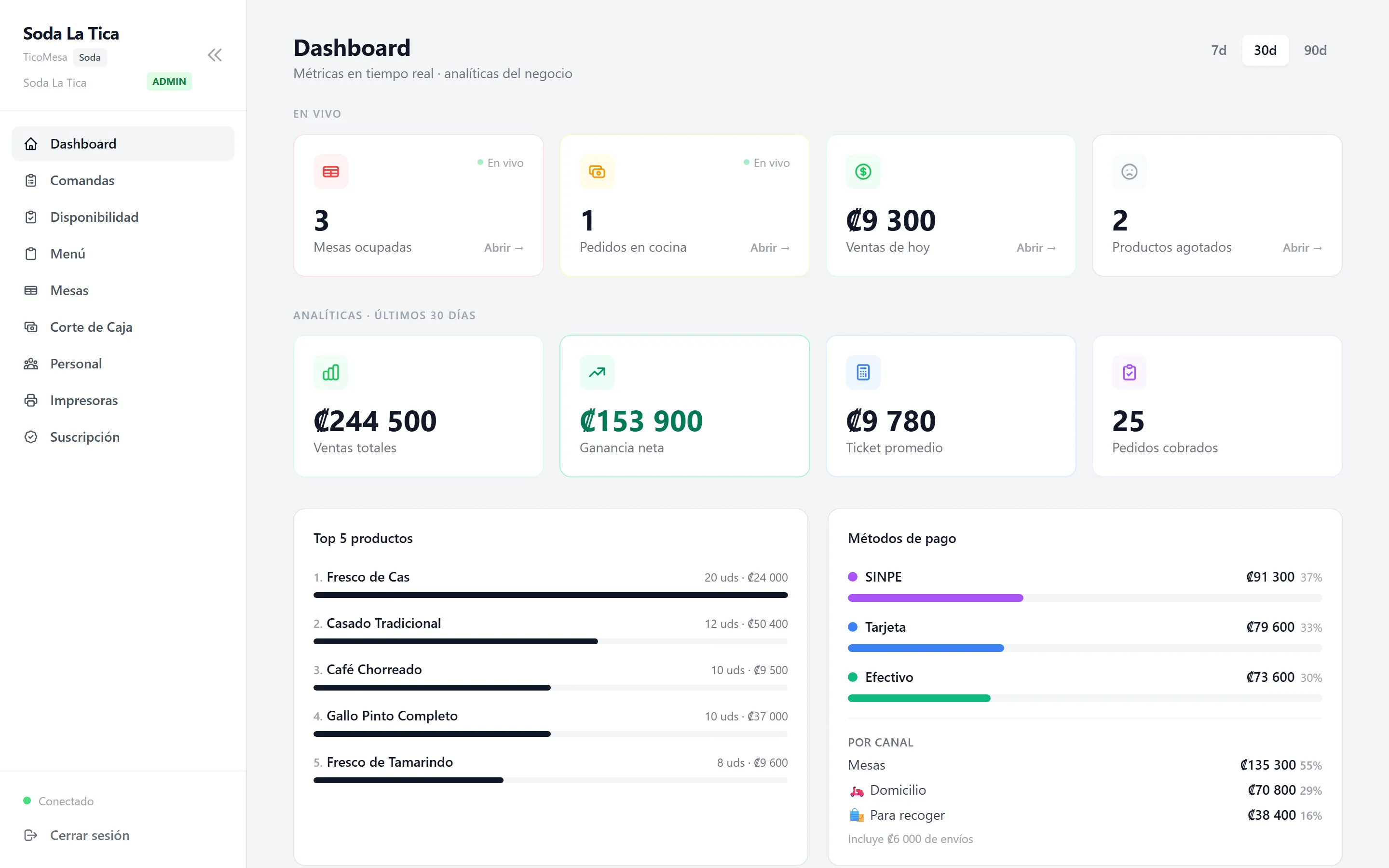
Net Profit: ₡153.900

Subtracts each dish recipe cost

Breakdown by payment method

SINPE Móvil, Card & Cash

Dashboard & Net Profit
Live and 30-day metrics dashboard showing total sales, net profit, top products, and payment methods
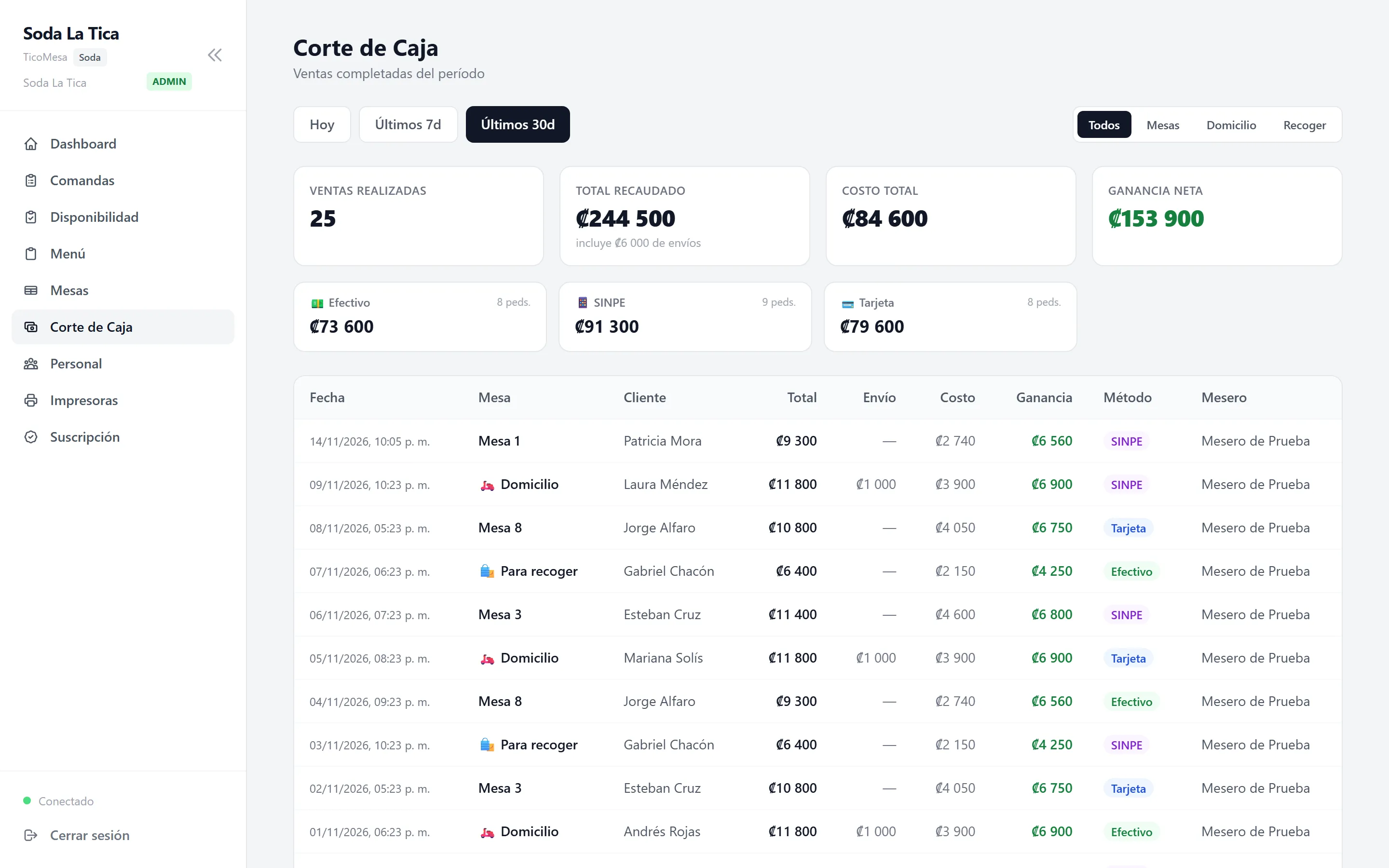
Register Closeout
End-of-day cash register closeout broken down by SINPE, Card, Cash, cost, and net profit per sale
4 · Cash closeout & real profit

Close the register in seconds and know your true profit

At closing time, stop adding up paper slips. See how much came in via cash, SINPE, and card, which dishes sell best, and your estimated profit after subtracting each dish cost.

  • Know how much you actually earned, not just total register sales.
  • Today, 7-, 30-, and 90-day reports split by tables, delivery, or pickup.
  • Real-time best-selling dishes ranking and average ticket size.

Delivery & pickup · Casado and Banquete Plans

Take delivery orders through your own link and pay ₡0 in commissions

Share your direct link on WhatsApp Status, Instagram, or your Google profile. Customers order for pickup or local delivery with fees you define—without giving away your margin to third parties.

  • Custom delivery fees and minimum order amounts by zone or neighborhood.
  • You confirm every order before sending it to the kitchen and log Cash, SINPE, or Card.
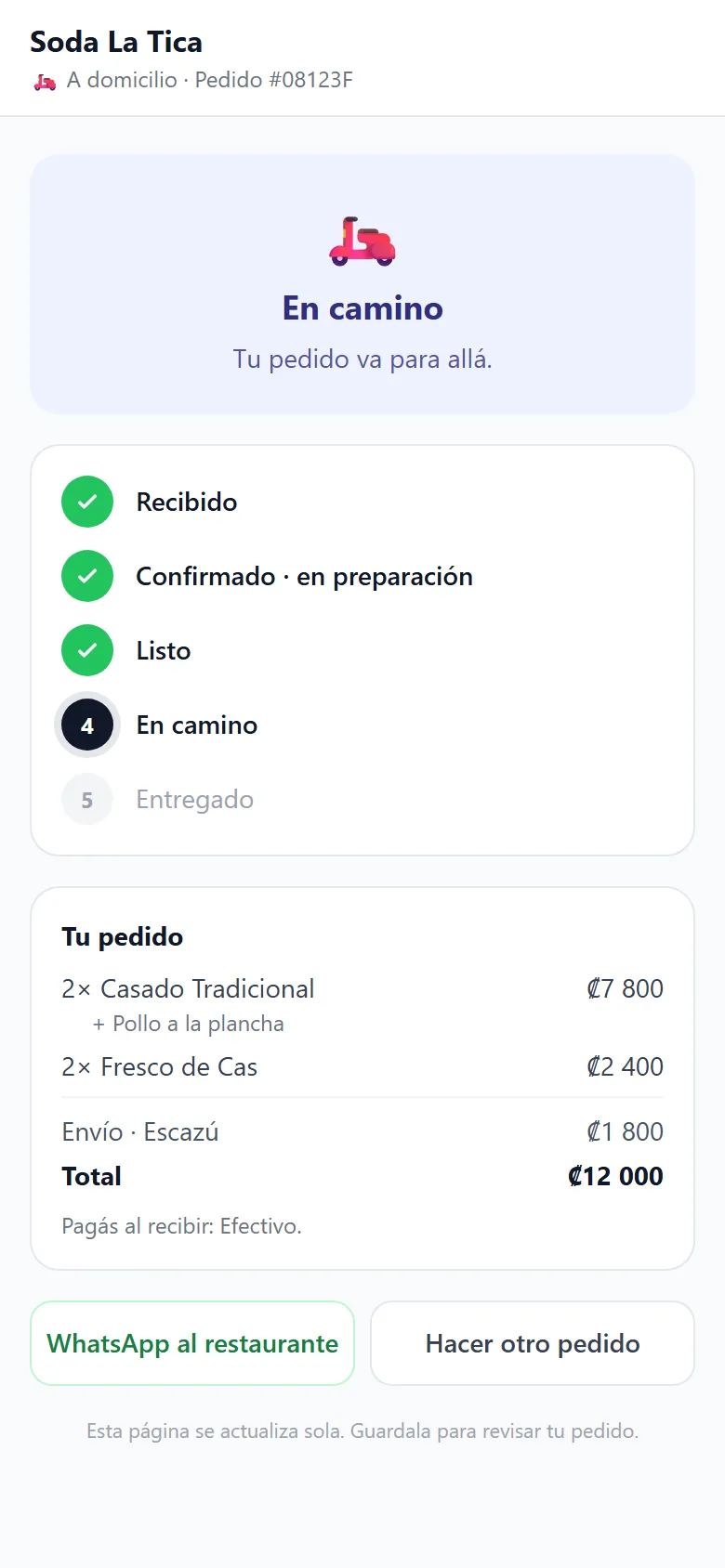
  • Customers track live order status and can message you on WhatsApp in one tap.
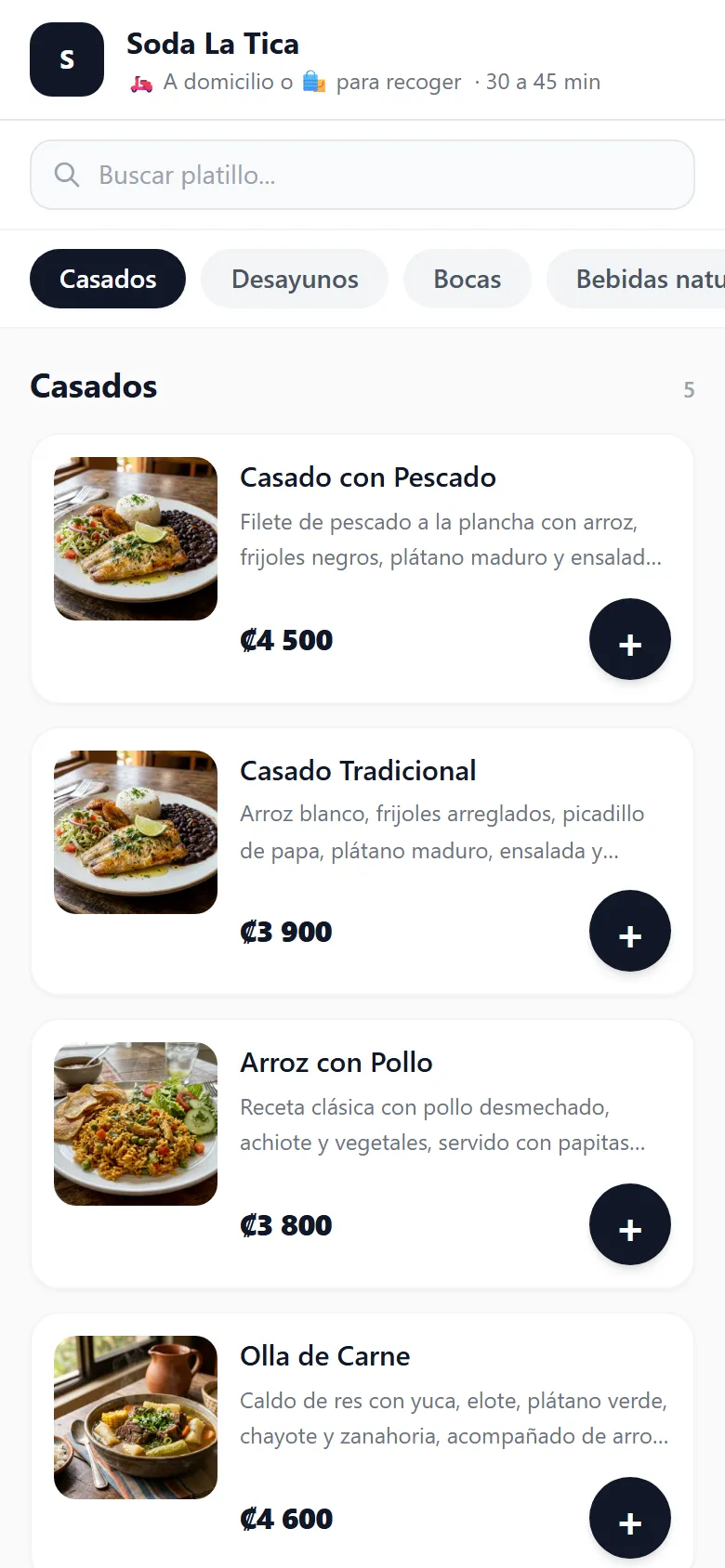
1. Your direct link
Delivery menu
Delivery and pickup menu screen showing estimated time and dish cards
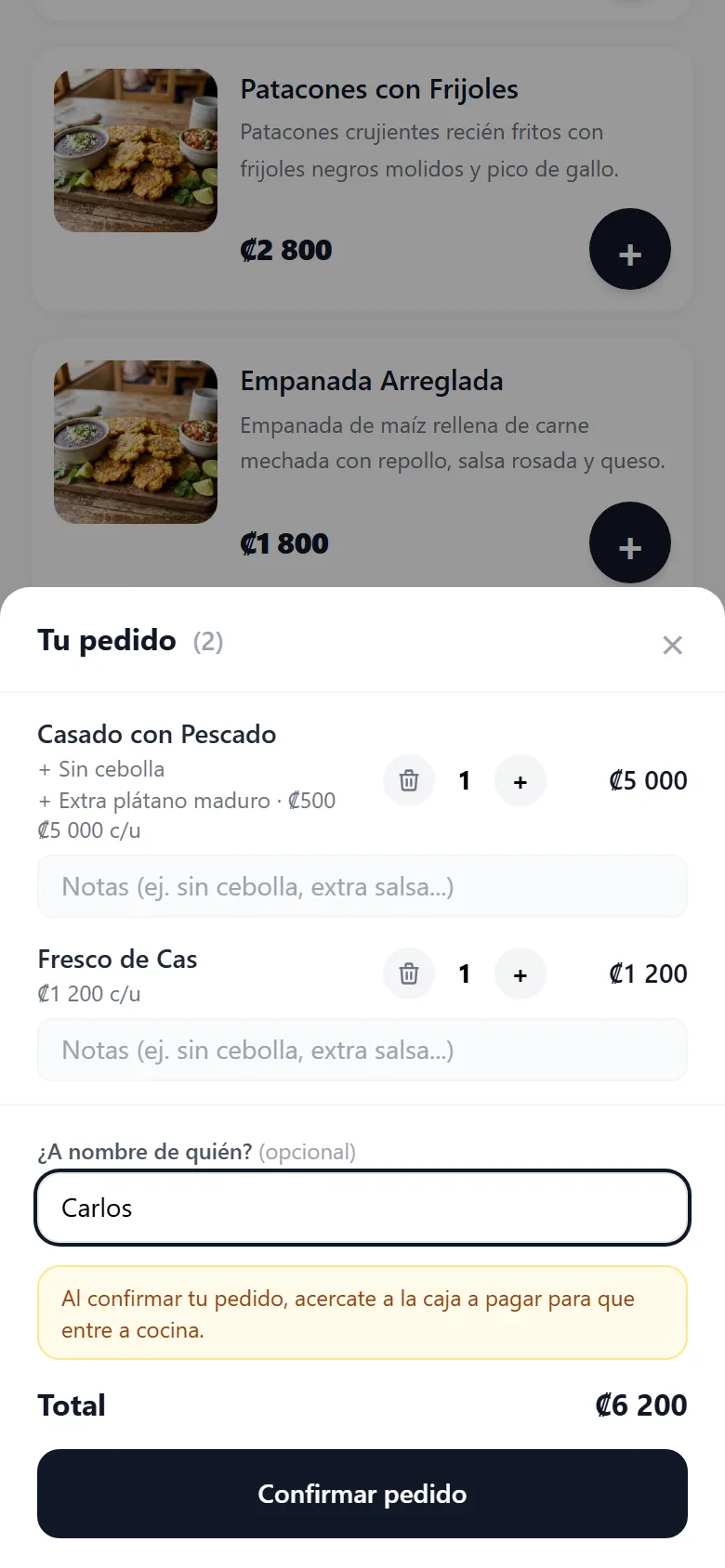
2. App-free cart
Direct order
Order cart showing Casado con Pescado, Fresco de Cas, notes, and total in colones
3. Live tracking
On the way
Live order tracking mobile page showing On the way status and WhatsApp restaurant link

Quick calculator

How much does an external app take in commissions today?

0% per order
12 orders
₡6.500
28%

Monthly external app commission

₡655.200

Calculated over 30 days of direct sales.

Net monthly savings with Casado Plan

₡627.100

After deducting ₡28.100/mo (~$55 USD).

I want to save these commissions → Chat on WhatsApp

Reference estimate (510 ₡/$). With TicoMesa you pay 0% commission per order; your restaurant handles its own courier or delivery logistics directly.

Transparent pricing

Flat monthly rate, zero commissions per dish sold

Every plan includes the digital QR menu, real-time kitchen display board, thermal printing, and sales & profit reports. Ask about launch pricing.

Gallito Plan

For small sodas, cafés, and walk-up counters looking to organize their dining room.

≈ ₡15.300 / month
$30 USD/mo

Equals ≈ ₡510/day · Pays for itself with just a few dishes a month

  • QR tables Up to 5
  • Staff users Up to 2
  • Menu items Up to 50
  • Pay at the end at table Not included
  • Delivery & pickup Not included
Inquire about Gallito Plan
Most popular

Casado Plan

The complete package: dining room, full table service, and commission-free delivery orders.

≈ ₡28.100 / month
$55 USD/mo

Equals ≈ ₡937/day · Pays for itself with just a few dishes a month

  • QR tables Up to 15
  • Staff users Up to 5
  • Menu items Up to 200
  • Pay at the end at table Included
  • Delivery & pickup Included (0%)
Inquire about Casado Plan

Banquete Plan

Unlimited tables, menu items, and staff accounts for high-volume restaurants.

≈ ₡45.900 / month
$90 USD/mo

Equals ≈ ₡1.530/day · Pays for itself with just a few dishes a month

  • QR tables Unlimited
  • Staff users Unlimited
  • Menu items Unlimited
  • Pay at the end at table Included
  • Delivery & pickup Included (0%)
Inquire about Banquete Plan

Reference exchange rate: ₡510 per USD · Final amount in colones depends on the bank or payment method agreed when activating your account.

Frequently asked questions

Straight answers, no fine print

We prefer to tell you upfront exactly what the tool does today and what stays outside its scope.

Do my guests need to download an app to order?

No. When they scan the table QR code with their phone camera or open your delivery link, the menu opens directly in their phone browser with nothing to install and no account required.

What thermal printer do I need and how does it connect?

Any standard 58 mm or 80 mm thermal printer with Bluetooth (from Chrome on Android, Windows, or macOS) or connected via direct USB cable on an Android tablet or phone. We do not connect network-only printers (Wi-Fi/Ethernet) or USB printers on Windows. And if you do not have a printer yet, you can run directly using the Kitchen Order Board screen.

Does the system issue Costa Rica Hacienda electronic invoices?

No. TicoMesa organizes your kitchen orders, tables, thermal tickets, and register closeouts with net profit, but it does not send electronic tax receipts to Hacienda. If you need electronic invoicing, you continue issuing it through your current provider.

How do SINPE Móvil, card, and cash payments work?

When closing or delivering an order, you record how the guest paid (Cash, SINPE Móvil, or Card on your terminal) so your register closeout balances accurately. TicoMesa does not process online card payments or hold any of your sales funds.

Do delivery orders include a driver?

No. The delivery link is yours to take direct orders with your own zone rates and ₡0 commission per order; delivery logistics and couriers are coordinated directly by your restaurant.

Do I need internet at my restaurant?

Yes, the QR menu and real-time kitchen order board require an internet connection to sync between the guest’s phone, dining room, and kitchen.

How do I get started, pay the monthly plan, and upload my menu?

Message us on WhatsApp to schedule a quick walkthrough with your own menu, check current launch pricing, and agree on the most convenient payment method when activating your account.

Have another question about your soda, café, or current printer? Ask us directly on WhatsApp .

Ready to test it on your tables?

Let’s chat 5 minutes on WhatsApp and see your menu working on your phone

We reply directly from Costa Rica—no bots or long forms. Ask about launch pricing for your first tables.